EtherChannel Explained: Link Aggregation Guide
EtherChannel (also known as Link Aggregation or Port Channeling) is a networking technology used to combine multiple physical Ethernet links into a single logical link called a Port-Channel (Po).
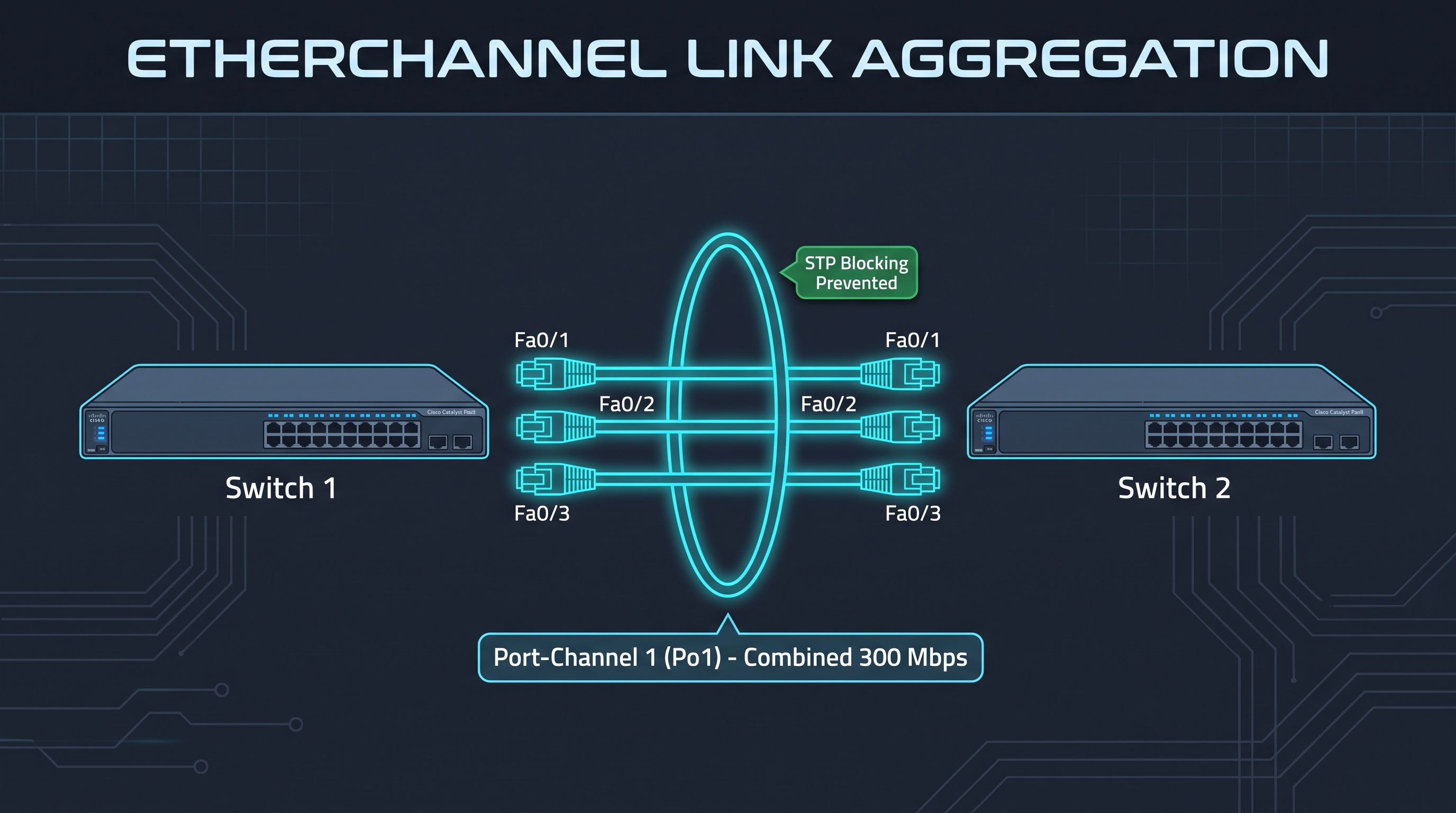
In standard switched topologies, connecting parallel physical links between switches creates Layer 2 loops. By default, Spanning Tree Protocol (STP) detects these redundant links and places all but one into a blocking/discarding state. This wastes network bandwidth and leaves redundant cables sitting idle.
EtherChannel bypasses this limitation by presenting multiple bundled interfaces to STP as a single virtual port, allowing all physical connections to forward frames simultaneously.
Key Benefits of Link Aggregation
- Multiplied Bandwidth: Aggregates up to 8 active physical links. For example, bundling three 100 Mbps FastEthernet links provides 300 Mbps of combined throughput.
- Prevents STP Port Blocking: Because Spanning Tree interacts only with the logical Port-Channel, all member interfaces remain active and forwarding.
- Seamless Failover & Redundancy: If an individual physical cable is disconnected, traffic immediately shifts across the surviving links without triggering an STP recalculation or network outage.
- Flow-Based Load Balancing: Distributes traffic across member links using frame-header hashing algorithms (evaluating source/destination MAC, IP, or Layer 4 ports) to prevent out-of-order packet delivery.
EtherChannel Architecture Diagram
 +-----------------------+                         +-----------------------+
 |    Switch 1 (SW1)     |                         |    Switch 2 (SW2)     |
 |                       |                         |                       |
 |  [Fa0/1] [Fa0/2] [Fa0/3]                       |  [Fa0/1] [Fa0/2] [Fa0/3]
 +-----+------+------+---+                         +-----+------+------+---+
       |      |      |                                   |      |      |
       |      |      |    ===========================    |      |      |
       +------+------+--->   Port-Channel 1 (Po1)    <---+------+------+
                           Combined Throughput: 300M
                           STP Status: All Active
                          ===========================
Negotiation Protocols: LACP vs. PAgP
Switches can negotiate and bring up an EtherChannel bundle automatically using one of two protocols:
| Feature | LACP (Link Aggregation Control Protocol) | PAgP (Port Aggregation Protocol) |
|---|---|---|
| Standard | IEEE 802.3ad / IEEE 802.1ax (Open Standard) | Cisco Proprietary |
| Compatibility | Multi-vendor (Cisco, Juniper, Linux, Windows Server) | Cisco hardware exclusively |
| Negotiation Modes | Active (initiates) / Passive (listens) | Desirable (initiates) / Auto (listens) |
| Usage | Industry standard in modern enterprise deployments | Legacy Cisco switched networks |
Protocol Mode Negotiation Matrix
| Protocol | Switch 1 Mode | Switch 2 Mode | Channel Result |
|---|---|---|---|
| LACP | Active | Active | Channel Forms ✅ |
| LACP | Active | Passive | Channel Forms ✅ |
| LACP | Passive | Passive | No Channel ❌ (Both listen silently) |
| PAgP | Desirable | Desirable | Channel Forms ✅ |
| PAgP | Desirable | Auto | Channel Forms ✅ |
| PAgP | Auto | Auto | No Channel ❌ (Both listen silently) |
Interface Match Requirements (Golden Rules)
To avoid channel negotiation failure and err-disable port status, member interfaces must share identical configurations:
- Port Speed & Duplex: All interfaces in the group must operate at matching speed and duplex settings.
- Switchport Mode: All ports must match identically (all access ports in the same VLAN, or all trunk ports).
- Trunking Parameters: When configured as trunks, all interfaces must share the same native VLAN and allowed VLAN range.
- Best Practice: Always apply VLAN, allowed VLAN, and trunk configuration commands directly to the virtual
interface port-channel 1rather than individual member ports.
CLI Configuration Walkthrough (LACP Example)
1. Bundle Physical Member Interfaces (SW1 & SW2)
SW1(config)# interface range fastEthernet 0/1 - 3
SW1(config-if-range)# channel-group 1 mode active
SW1(config-if-range)# exit
2. Configure the Logical Interface as a Trunk
SW1(config)# interface port-channel 1
SW1(config-if)# switchport mode trunk
SW1(config-if)# exit
Verification Commands
show etherchannel summary— Confirms the Port-Channel operational state (look for flagsSUfor Layer 2 In-Use andPfor bundled ports).show interfaces trunk— Confirms that the virtual interfacePo1is operating as an active 802.1Q trunk.show etherchannel port-channel— Displays protocol information (LACP/PAgP) and active member interfaces.
🛠️ Hands-On Cisco Packet Tracer Lab Files
Configure LACP (802.3ad) and PAgP EtherChannel port bundles in Packet Tracer. Download the topology file and step-by-step PDF manual: