Introduction to Big Data
1. What Is Big Data?
Big Data refers to extremely large, complex, and rapidly generated collections of data that traditional data-processing methods may struggle to store, process, and analyze efficiently.
Big Data is not simply "a lot of data." It also involves the speed, variety, complexity, and usefulness of the data.
Examples include:
- Social media posts and interactions
- Online shopping transactions
- YouTube videos and viewing activity
- GPS and location data
- Banking transactions
- IoT sensor data
- Website logs
- Healthcare records
- Football and sports statistics
2. Why Is Big Data Important?
Organizations generate enormous amounts of information every day.
Big Data technologies allow organizations to:
- Process large datasets
- Discover patterns
- Make data-driven decisions
- Detect unusual activity
- Improve products and services
- Personalize customer experiences
- Predict future trends
- Analyze information in near real time
For example, an online shopping platform can analyze millions of customer interactions to understand which products are viewed, purchased, or abandoned.
3. The 5 Vs of Big Data
Big Data is commonly explained using the 5 Vs:
- Volume
- Velocity
- Variety
- Veracity
- Value
3.1 Volume
Volume refers to the amount of data.
Modern organizations may store terabytes, petabytes, or even larger quantities of data.
Example:
A video platform may store millions of uploaded videos and billions of viewing events.
3.2 Velocity
Velocity refers to how quickly data is generated, transferred, and processed.
Examples include:
- Stock market transactions
- Credit card transactions
- GPS signals
- Social media activity
- IoT sensors
Some applications require data to be processed almost immediately.
3.3 Variety
Variety describes the different forms of data.
Structured Data
Data organized into tables.
Example:
Player_ID | Name | Goals | Assists
101       | John | 15    | 8
102       | Alex | 10    | 12
Semi-Structured Data
Data that has some organizational structure but does not necessarily follow a traditional table format.
Examples:
- JSON
- XML
- HTML
Example JSON:
{
  "player": "John",
  "goals": 15,
  "assists": 8
}
Unstructured Data
Data without a fixed tabular structure.
Examples:
- Images
- Videos
- Audio
- Documents
- Social media posts
3.4 Veracity
Veracity refers to the quality, reliability, and accuracy of data.
Big Data can contain:
- Incorrect information
- Duplicate records
- Missing values
- Spam
- Noise
- Biased information
Poor-quality data can lead to poor decisions.
3.5 Value
Value refers to the useful information that can be obtained from data.
Collecting huge amounts of data is not enough.
The important question is:
"What useful information can we obtain from this data?"
4. Big Data vs Traditional Data
Traditional systems are often designed for datasets that can be processed using conventional databases and servers.
Big Data systems are designed to handle situations involving very large datasets, high data-generation rates, or many different data formats.
| Traditional Data Processing | Big Data Processing | |---|---| | Smaller datasets | Very large datasets | | Often centralized | Often distributed | | Structured data is common | Structured, semi-structured, and unstructured data | | Conventional databases | Distributed storage and processing systems | | Scaling can be limited | Designed for horizontal scaling |
The exact boundary between "traditional" and "big" data depends on the organization and technology being used.
5. Big Data Architecture
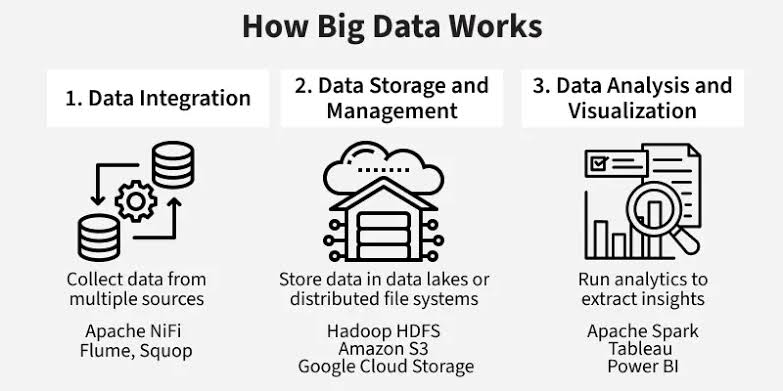
A typical Big Data system can contain several stages:
Data Sources
     ↓
Data Ingestion
     ↓
Data Storage
     ↓
Data Processing
     ↓
Data Analysis
     ↓
Visualization / Applications
Data Sources
Data can come from:
- Websites
- Mobile applications
- Sensors
- Databases
- APIs
- Social media
- Machines
- Business systems
Data Ingestion
Data ingestion means collecting data and moving it into a system where it can be stored and processed.
Common approaches include:
- Batch processing
- Stream processing
Data Storage
Large datasets may be stored across multiple machines.
Examples include:
- Distributed file systems
- Object storage
- NoSQL databases
- Data warehouses
- Data lakes
Data Processing
Processing systems transform and analyze large datasets.
Examples include:
- Apache Spark
- Hadoop MapReduce
- Apache Flink
6. Hadoop
Apache Hadoop is an open-source framework designed for distributed storage and processing of large datasets.
Hadoop became an important technology in the development of modern Big Data systems.
Its major components include:
- HDFS — Hadoop Distributed File System
- YARN — resource management and job scheduling
- MapReduce — distributed batch processing
HDFS
HDFS stores large files by distributing their data across multiple machines.
Instead of depending on one computer, data can be distributed across a cluster.
Large File
    ↓
+---------+---------+---------+
| Block 1 | Block 2 | Block 3 |
+---------+---------+---------+
     ↓         ↓         ↓
 Server A  Server B  Server C
This distributed approach can improve scalability and fault tolerance.
7. Apache Spark
Apache Spark is a distributed data-processing engine widely used for large-scale data processing and analytics.
Spark supports workloads such as:
- Batch processing
- SQL analytics
- Streaming
- Machine learning
- Graph processing
A simplified Spark workflow is:
Large Dataset
      ↓
Spark Cluster
      ↓
Distributed Processing
      ↓
Results
Spark can work with data stored in systems such as cloud object storage, HDFS, and databases.
8. Batch Processing vs Stream Processing
Batch Processing
Batch processing handles data in groups.
Example:
A company processes all sales transactions from the previous day at midnight.
Day 1 Data
   ↓
Collect
   ↓
Process
   ↓
Report
Batch processing is useful when immediate results are not required.
Stream Processing
Stream processing handles data continuously as it arrives.
Example:
A payment system analyzes transactions as they happen.
Event → Process → Result
Event → Process → Result
Event → Process → Result
Stream processing is useful for applications that require low-latency analysis.
9. NoSQL Databases
Traditional relational databases store information in tables with predefined schemas.
NoSQL databases are designed to support different data models and can be useful for large-scale distributed applications.
Common NoSQL categories include:
- Document databases
- Key-value databases
- Column-family databases
- Graph databases
Examples of technologies include:
- MongoDB
- Apache Cassandra
- Redis
- Neo4j
NoSQL does not mean that relational databases are obsolete. The appropriate database depends on the application's requirements.
10. Data Lake and Data Warehouse
Data Warehouse
A data warehouse is designed primarily for structured, organized data and analytical queries.
It is commonly used for:
- Business intelligence
- Reporting
- Dashboards
- Historical analysis
Data Lake
A data lake can store large amounts of raw data in different formats.
It may contain:
- CSV files
- JSON
- Images
- Videos
- Logs
- Sensor data
A simplified comparison:
| Data Warehouse | Data Lake | |---|---| | Mostly structured data | Structured and unstructured data | | Highly organized | Can contain raw data | | Strongly designed for analytics | Flexible storage and processing | | Schema is commonly defined before analysis | Schema can often be applied when reading |
Modern cloud platforms may combine capabilities associated with both approaches.
11. Cloud Computing and Big Data
Cloud platforms make it easier to build scalable Big Data systems without owning large physical data centers.
Major cloud providers include:
- Amazon Web Services (AWS)
- Microsoft Azure
- Google Cloud
Cloud services can provide:
- Storage
- Virtual machines
- Databases
- Data warehouses
- Data processing
- Streaming systems
- Machine learning services
Cloud computing and Big Data are closely related because cloud infrastructure can scale computing and storage resources as requirements change.
12. Big Data and Machine Learning
Big Data and Machine Learning often work together.
A typical workflow might be:
Large Dataset
     ↓
Data Cleaning
     ↓
Feature Engineering
     ↓
Machine Learning
     ↓
Model Evaluation
     ↓
Predictions
Large datasets can provide more examples for machine learning, but more data does not automatically mean a better model.
Data quality, relevance, sampling, features, and model design are also important.
13. Big Data in Football
Big Data has many applications in football.
A club could collect:
- Player positions
- Distance covered
- Sprint speed
- Passes
- Shots
- Tackles
- Possession
- Expected goals (xG)
- Expected assists (xA)
- Match events
- Training data
For example:
Match Data
     ↓
Collect Player Statistics
     ↓
Store Large Dataset
     ↓
Process With Big Data Tools
     ↓
Analyze Performance
     ↓
Create Insights
A club could use this information to study team tactics, player workload, match patterns, and performance.
14. Big Data in Formula 1
Formula 1 is another excellent example of a data-intensive environment.
Cars and teams can generate large amounts of telemetry and operational data.
Possible data sources include:
- Vehicle sensors
- Lap times
- Tire information
- Engine measurements
- GPS/location data
- Weather data
- Race timing
- Driver inputs
Teams can analyze this information to understand car performance, tire behavior, strategy, and race conditions.
15. Big Data and Artificial Intelligence
AI systems can depend on large datasets for training and evaluation.
For example:
Large Dataset
      ↓
Data Processing
      ↓
Feature / Training Data
      ↓
Machine Learning Model
      ↓
AI Application
However, AI is not simply the same thing as Big Data.
- Big Data focuses on handling and gaining value from large and complex datasets.
- Machine Learning focuses on algorithms that learn patterns from data.
- AI is a broader field involving systems that perform tasks associated with intelligent behavior.
These technologies often overlap.
16. Advantages of Big Data
Big Data technologies can provide several benefits:
Better Decision Making
Organizations can use large datasets to support decisions with evidence.
Improved Customer Experience
Businesses can analyze customer behavior and preferences.
Fraud Detection
Financial institutions can analyze transactions to identify unusual patterns.
Real-Time Monitoring
Streaming systems can process events as they happen.
Scientific Research
Researchers can analyze large datasets that would be difficult to process using traditional methods.
Sports Analytics
Sports organizations can analyze player and team performance.
17. Challenges of Big Data
Big Data also creates significant challenges.
Storage
Very large datasets require scalable storage systems.
Processing
Processing large datasets efficiently can require distributed computing.
Data Quality
Large datasets may contain inaccurate or incomplete information.
Security
Sensitive data must be protected from unauthorized access.
Privacy
Organizations need to handle personal information responsibly and follow applicable laws and regulations.
Cost
Large-scale infrastructure can be expensive if it is not designed and managed efficiently.
Complexity
Distributed systems can be more difficult to develop, operate, and troubleshoot.
18. Important Big Data Technologies
| Technology | Purpose | |---|---| | Hadoop | Distributed storage and processing ecosystem | | HDFS | Distributed file storage | | Spark | Large-scale data processing | | Kafka | Event streaming platform | | Flink | Stream and batch processing | | MongoDB | Document database | | Cassandra | Distributed wide-column database | | Redis | In-memory data store | | Hive | SQL-based data warehouse infrastructure for Hadoop | | Trino | Distributed SQL query engine | | Airflow | Workflow orchestration |
This is not an exhaustive list, and technologies change over time.
19. Beginner Big Data Roadmap
A beginner can follow this learning path:
Stage 1 — Programming
Learn:
- Python
- Basic algorithms
- Data structures
- File handling
Stage 2 — Databases
Learn:
- SQL
- Relational databases
- Database design
- Basic NoSQL concepts
Stage 3 — Data Analysis
Learn:
- Pandas
- NumPy
- Data visualization
- Statistics
Stage 4 — Linux and Networking Basics
Learn:
- Command line
- Processes
- Filesystems
- Networking fundamentals
Stage 5 — Distributed Systems
Understand:
- Clusters
- Nodes
- Replication
- Partitioning
- Fault tolerance
- Horizontal scaling
Stage 6 — Big Data Technologies
Start learning:
- Hadoop
- HDFS
- Spark
- Kafka
Stage 7 — Cloud
Learn at least one major cloud platform:
- AWS
- Azure
- Google Cloud
Stage 8 — Build Projects
Examples:
- Large-scale football analytics
- F1 telemetry analysis
- Website log analysis
- Streaming sensor-data project
- Customer transaction analytics
- Social-media data pipeline
20. Simple Big Data Project Example
Imagine you want to analyze millions of football events.
A traditional Python script running on one computer may not be the best approach when the dataset becomes extremely large.
A distributed architecture could look like:
Football Event Sources
          ↓
       Kafka
          ↓
   Data Storage
          ↓
       Spark
          ↓
 Data Transformation
          ↓
     Analytics
          ↓
 Dashboard / ML Model
The same general architecture can be adapted for many industries.
21. Key Terms to Remember
Dataset
A collection of related data.
Cluster
A group of computers working together.
Node
An individual computer in a distributed system.
Distributed Computing
Using multiple computers to perform a computational task.
Scalability
The ability of a system to handle increasing workload.
Horizontal Scaling
Adding more machines to a system.
Vertical Scaling
Increasing the resources of an existing machine.
Replication
Keeping copies of data on multiple systems.
Partitioning
Dividing data into smaller parts.
Fault Tolerance
The ability of a system to continue operating when components fail.
Data Pipeline
A sequence of steps that moves and transforms data.
22. Conclusion
Big Data is about more than simply storing huge amounts of information. It involves technologies and methods for collecting, storing, processing, analyzing, and gaining value from large, fast-moving, and diverse datasets.
Important concepts to learn include:
5 Vs → Distributed Systems → Storage → Processing → Streaming → Databases → Cloud → Analytics → Machine Learning
A strong beginner should first build foundations in Python, SQL, databases, statistics, and data analysis. Then they can move into distributed systems and technologies such as Hadoop, Spark, and Kafka.
The best way to understand Big Data is through projects that solve real problems with large or continuously generated datasets.
References
-
Apache Hadoop Documentation: https://hadoop.apache.org/docs/
-
Apache Spark Documentation: https://spark.apache.org/docs/latest/
-
Apache Kafka Documentation: https://kafka.apache.org/documentation/
-
Apache Flink Documentation: https://flink.apache.org/
-
IBM, Big Data: https://www.ibm.com/think/topics/big-data
-
Google Cloud, Big Data: https://cloud.google.com/learn/what-is-big-data
-
AWS, What is Big Data?: https://aws.amazon.com/what-is/big-data/