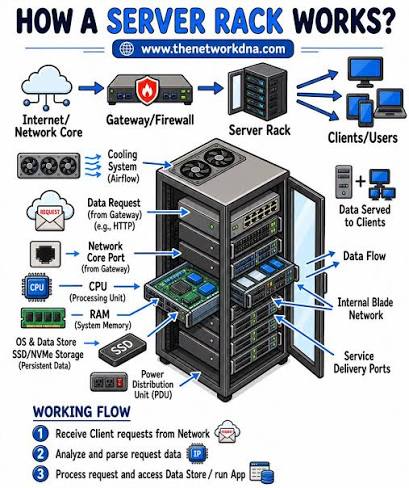
The Ultimate Guide to Computer Servers: Architecture, Types, and Modern Infrastructure
In digital infrastructure, servers serve as the backbone of modern software applications, enterprise networks, websites, and cloud computing platforms. While a personal computer is designed for direct human interaction, a server is built to process requests, manage data, and deliver services to other computers (clients) over a network.
1. What is a Server?
At its core, a server is a combination of specialized software and hardware that provides functionality or resources to other devices, known as clients. This architecture is referred to as the client-server model.
    [ Client: Smartphone ]  ───┐
                               │  Requests (HTTP/Database/Files)
    [ Client: Laptop ]     ───┼─────────────────────────────────►  [ SERVER ]
                               │  ◄─────────────────────────────
    [ Client: Desktop ]    ───┘   Responses (Data/Web Pages)
Key Differences Between Servers and Personal Computers
| Feature | Personal Computer (PC) | Server | | :--- | :--- | :--- | | Primary Goal | Direct user operation | Unattended service delivery | | Uptime Target | Intermittent (powered off daily) | 99.99%–99.999% continuous operation | | Hardware | Consumer-grade CPU, RAM | Multi-socket CPUs, ECC RAM, redundant PSUs | | Operating System| Windows 11, macOS, Ubuntu Desktop | Linux (RHEL, Ubuntu Server), Windows Server | | Redundancy | Low (single drive, single PSU) | High (RAID storage, dual power supplies) |
2. Core Hardware Components of Server Systems
Server hardware is designed for sustained workloads, high throughput, and fault tolerance.
High-Density Processors (CPUs)
Unlike desktop chips, server processors (such as Intel Xeon or AMD EPYC) feature higher core counts, larger cache capacities, support for multi-socket configurations, and expanded PCIe lanes to handle massive parallel processing.
ECC (Error-Correcting Code) Memory
Memory errors can cause application crashes and data corruption. ECC RAM detects and corrects single-bit memory errors on the fly, ensuring system stability for mission-critical tasks.
Redundant Power Supplies (PSUs)
Enterprise servers contain hot-swappable power supply units connected to independent power feeds. If one power unit or circuit fails, the backup PSU immediately maintains operation without system downtime.
High-Reliability Storage & RAID
Server storage uses high-end drives (SAS, NVMe Enterprise SSDs) configured in RAID (Redundant Array of Independent Disks) setups. RAID distributes data across multiple drives to increase input/output performance and protect against physical drive failure.
3. Major Types of Servers
Depending on the service being delivered, servers fall into distinct categories:
Web Servers
- Role: Serves web content (HTML, CSS, JavaScript, images) to user browsers via HTTP/HTTPS protocols.
- Common Software: Nginx, Apache HTTP Server, Caddy, IIS.
Application Servers
- Role: Hosts core business logic, middleware, and dynamic server-side scripts that power applications.
- Common Frameworks/Runtimes: Node.js, Spring Boot, ASP.NET Core, Tomcat.
Database Servers
- Role: Stores, queries, and manages structured or unstructured data securely.
- Common Engines: PostgreSQL, MySQL, Microsoft SQL Server, MongoDB, Oracle DB.
File and Storage Servers
- Role: Manages centralized files accessible by multiple users across local networks (NAS/SAN).
- Common Protocols: SMB/CIFS, NFS, FTP.
Mail Servers
- Role: Handles sending, receiving, and routing emails across networks.
- Common Protocols/Software: SMTP, IMAP, POP3; Postfix, Microsoft Exchange.
DNS (Domain Name System) Servers
- Role: Translates human-readable domain names (e.g.,
example.com) into numerical IP addresses (e.g.,192.0.2.1).
4. Physical Form Factors
Depending on deployment requirements and data center scale, servers come in several physical layouts:
┌─────────────────────────────────────────────────────────┐
│                    Tower Server                         │
│  Standalone unit, similar to a traditional desktop PC.  │
│  Ideal for small offices and local branch deployments.  │
└─────────────────────────────────────────────────────────┘

┌─────────────────────────────────────────────────────────┐
│                    Rack Server                          │
│  Flat modules stacked vertically in standard 19-inch   │
│  server racks (measured in Units: 1U, 2U, 4U).          │
└─────────────────────────────────────────────────────────┘

┌─────────────────────────────────────────────────────────┐
│                    Blade Server                         │
│  Ultra-dense, modular units sliding into a shared       │
│  chassis that centralizes power and networking.         │
└─────────────────────────────────────────────────────────┘
5. Modern Server Architectures
The way servers are deployed and managed has evolved from physical metal boxes to software-defined virtual infrastructure.
On-Premises Bare-Metal
Running applications directly on physical server hardware without a hypervisor layer. This offers maximum performance and direct access to underlying hardware components.
Virtualization
Using a Hypervisor (such as VMware ESXi, Proxmox VE, or KVM) to split a single physical server into multiple isolated Virtual Machines (VMs), each running its own operating system.
Cloud Computing
Renting server infrastructure on demand from public cloud providers (Amazon Web Services, Microsoft Azure, Google Cloud). Cloud computing eliminates upfront hardware investments and enables rapid resource scaling.
Serverless & Containerized Infrastructure
Modern applications increasingly run inside lightweight Containers (e.g., Docker, orchestrated by Kubernetes) or via Serverless Functions (e.g., AWS Lambda), where the underlying server allocation and scaling are fully automated by software.
6. Server Maintenance Best Practices
- Automated Monitoring: Implement health checks for CPU usage, RAM utilization, thermal metrics, and disk health (S.M.A.R.T. monitoring).
- Patch Management: Regularly update operating systems and application software to protect against known vulnerabilities.
- Robust Backup Strategies: Follow the 3-2-1 backup rule (3 copies of data, 2 different media types, 1 offsite location).
- Environment Controls: Ensure data centers maintain strict temperature and humidity controls to prevent physical hardware degradation.
Summary
Servers are the fundamental building blocks of modern information technology. Whether hosted on a physical rack in an office closet or running as a virtualized instance in a massive public cloud data center, servers provide the compute, memory, storage, and networking power necessary to keep global systems connected and operating.