Networking Hubs
Introduction
A networking hub is a basic networking device used to connect multiple computers and other devices within a local area network (LAN). It receives data from one device and forwards it to all other connected devices.
Although traditional hubs have largely been replaced by network switches, they are still useful for understanding the basic principles of computer networking.
What Is a Networking Hub?
A networking hub is a hardware device that connects several network devices through Ethernet cables. When a hub receives a data packet, it sends a copy of that packet to every device connected to its ports.
For example, if four computers are connected to a hub, data sent from one computer is broadcast to the other three computers. The receiving devices determine whether the data is intended for them.
How a Networking Hub Works
A hub operates mainly at Layer 1 (the Physical Layer) of the OSI model. It does not examine destination MAC addresses or make intelligent forwarding decisions.
The basic process is:
- A device sends data to the hub.
- The hub receives the electrical signal.
- The hub repeats the signal through its other ports.
- All connected devices receive the transmission.
- The intended device processes the data.
Because the hub sends data to all ports, unnecessary network traffic can be created.
Types of Networking Hubs
1. Passive Hub
A passive hub simply receives and distributes network signals. It does not amplify or regenerate the signal.
2. Active Hub
An active hub receives, regenerates, and retransmits network signals. It requires electrical power and can help maintain signal quality.
3. Intelligent Hub
An intelligent hub provides additional management and monitoring features compared with a basic hub. However, modern network switches have largely replaced this type of device.
Advantages of Networking Hubs
- Simple to install and use.
- Relatively inexpensive.
- Can connect multiple network devices.
- Useful for learning basic networking concepts.
- Does not require complex configuration.
Disadvantages of Networking Hubs
- Sends data to every connected device.
- Creates unnecessary network traffic.
- Provides lower performance than a switch.
- All connected devices share the available bandwidth.
- Does not provide intelligent traffic management.
- Can create more collisions in traditional Ethernet networks.
- Provides limited security because traffic is broadcast to all ports.
Hub vs. Switch
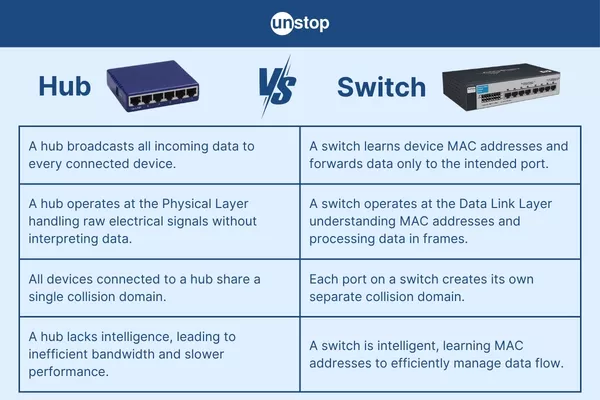
A hub and a switch both connect devices within a network, but they operate differently.
| Feature | Hub | Switch | |---|---|---| | OSI layer | Layer 1 | Mainly Layer 2 | | Data forwarding | Sends data to all ports | Sends data to the intended port | | Traffic management | Limited | More efficient | | Network collisions | More likely | Greatly reduced | | Performance | Lower | Higher | | Modern usage | Rare | Very common |
Uses of Networking Hubs
Traditional hubs are rarely used in modern networks, but they can still be useful in:
- Networking education and training.
- Demonstrations of Ethernet communication.
- Simple laboratory environments.
- Testing certain network monitoring techniques.
- Understanding the difference between hubs and switches.
Why Switches Replaced Hubs
Network switches provide more efficient communication because they learn the MAC addresses of connected devices and forward frames only through the appropriate port. This reduces unnecessary traffic and improves network performance.
As a result, switches are now the standard choice for most modern wired LANs.
Conclusion
A networking hub is a simple device that connects multiple devices in a local area network and broadcasts incoming data to all connected ports. While hubs played an important role in the development and understanding of Ethernet networks, they have mostly been replaced by switches because switches provide better performance, efficiency, and network management.
Understanding networking hubs remains valuable because it provides a foundation for learning how modern network switches and local area networks operate.